


Cloudflare’s global network runs code at the edge, closer to users, to speed up content delivery. Edge computing “brings computing as close to the source of the data as possible in order to reduce latency”. In practice, Cloudflare deploys its Workers runtime in 300+ data centers worldwide, so image workloads and scripts execute near each visitor. This yields reduced latency, auto-scaling, and built-in security for your app. For example, Cloudflare says Workers provide “reduced latency” (faster responses), “improved scalability” (serverless code that scales automatically), and “enhanced security” (an extra layer shielding the origin). In short, Cloudflare image processing at the edge means you can transform or resize images on-demand in a Worker and have the result served from the nearest data center, greatly cutting load times.
Cloudflare Workers and Sharp for Edge Image Transformation
Cloudflare Workers let developers run custom JavaScript at the edge, but they do not natively support the Node.js Sharp library (which relies on native binaries and multithreading). As one developer observed, Sharp “cannot run on Cloudflare Worker in the short term” due to threading limitations. Instead of using Sharp directly, Cloudflare provides built-in image APIs and even lets you compile other libraries to WebAssembly (Wasm). For example, Workers do support Wasm, so in theory you could use a WASM-compiled image library. However, Cloudflare’s own Images API is designed to handle most use cases out of the box. The new Images binding for Workers allows you to call env.IMAGES methods directly in your Worker to manipulate images on the fly. Within a Worker, this binding offers commands like .transform(), .draw(), .output(), and .info() to crop, rotate, resize, watermark, and get metadata for images.
- Sharp is not supported: Workers run in a V8 isolate without Node’s threads or filesystem, so modules like Sharp (which use libvips and threads) won’t work natively.
- Use Cloudflare’s image APIs instead: The built-in Image service (via the Images binding or the
cf.imagefetch()options) handles resizing and optimization automatically. - Community alternatives: Some projects (e.g. an “Image Worker” MCP) do use Sharp.js (a WASM port of Sharp) on Workers to resize and effect images, but for most needs the native APIs are simpler.
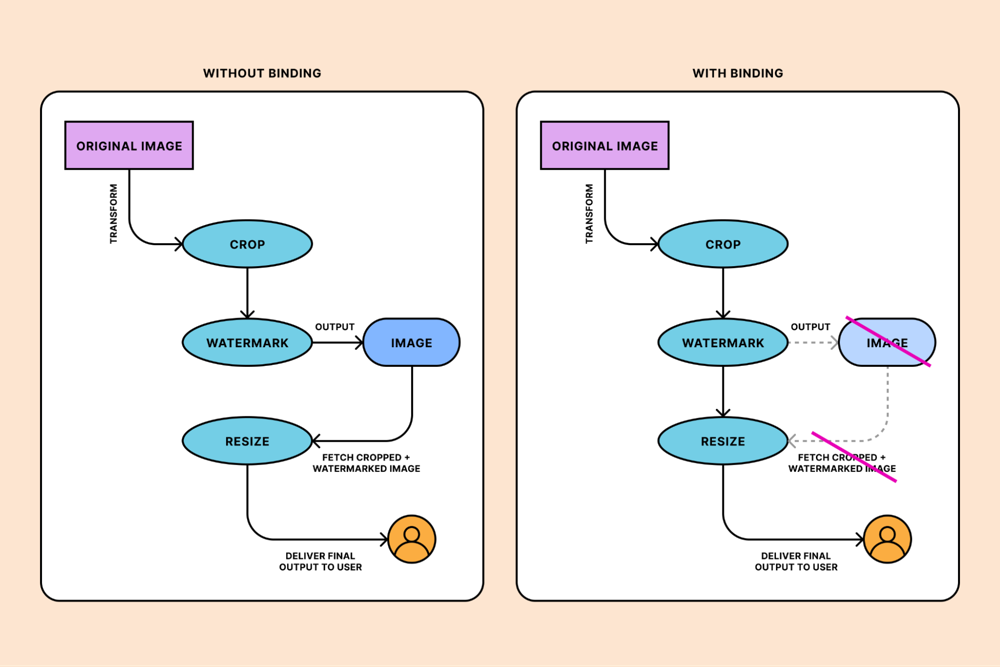
With the Images binding, you can chain operations without multiple HTTP fetches. For example, you could write:
await env.IMAGES.input(imageStream)
     .transform({ rotate: 90 })
     .transform({ width: 128 })
     .transform({ blur: 20 })
     .output({ format: "png" });
This would rotate, resize, and blur the image in one go. The figure below illustrates how the Images binding collapses what would otherwise be multiple fetch calls into a single pipeline.
 Figure: Using the Images binding on Cloudflare Workers (right) lets you chain image operations in one request. Without the binding (left) you’d need multiple fetch/transform steps; with the binding, transforms (crop, watermark, resize, etc.) occur in a single workflow.
Benefits of Edge Image Processing
Offloading image work to the edge brings big performance gains. Real-world tests show that sites using Workers see up to 50% faster page loads compared to traditional back-end implementations. Similarly, Cloudflare’s Image Resizing service promises tailored images on the fly: it “dynamically adjusts image resolution, format, and compression based on the user’s device” (auto-converting to WebP, resizing pixels for mobile, etc.). The practical benefits include:
- Bandwidth Savings: Serving appropriately sized images cuts bytes sent. Dynamically resizing at the edge reduces bandwidth costs and speeds up loads.
- Enhanced User Experience: Users get crisp images optimized for their screen. Faster loads and high-quality visuals reduce bounce rates.
- SEO Advantage: Faster pages rank better. Search engines boost sites with quick load times, so edge image optimization directly improves SEO.
Developers see these benefits in many scenarios. For instance, e-commerce platforms use Workers to personalize checkouts and use Cloudflare’s image tools so product photos load sharp on all devices. SaaS apps offload heavy API calls to edge Workers and rely on image processing to display charts or dashboards quickly to global users. Media and publishing sites handle traffic spikes with Cloudflare’s cache + image resizing: content (text or static media) is pre-warmed at the edge, while images are resized or compressed in-flight, allowing visually rich pages (news, galleries) to load quickly even under load.
Traditional vs. Cloudflare Image Pipelines
Traditionally, developers might generate multiple versions of each image (small, medium, large) and store them on a server or CDN. This adds complexity and storage cost. By contrast, Cloudflare’s approach is to store only the original image (or none at all) and create variants on demand. As Cloudflare notes, its Images product “eliminate[s] the complexity of storing multiple copies of the same image. … You can dynamically deliver multiple variants of the same original image.” In practice, this means you don’t need separate files for every size: the edge will resize, crop, or convert on the fly. In one unified pipeline, you can call Cloudflare’s Image API to get a 200×200 PNG thumbnail, a 4K WebP for high-end displays, or a heavily-compressed version for mobile — all without managing extra files. This is much simpler than a static pipeline where each version must be pre-generated and cached manually.
Cloudflare’s Global Edge Architecture
Cloudflare’s network spans hundreds of cities worldwide, so every image transform or cache lookup happens close to the user. This global scale (over 330 cities, according to Cloudflare) means very low latency and high availability. When a visitor requests an image, Cloudflare checks its edge cache or runs your Worker in the nearest PoP, avoiding multiple back-and-forth trips to origin.
Cloudflare also handles failover and DDoS at the edge, so your origin servers never get overwhelmed by spikes. The figure below shows the edge computing principle: by processing data near the source (user/device), we cut latency. Cloudflare’s own definition holds: edge computing “reduces the need for long-distance communication between client and server”, which is exactly what its Workers and caching accomplish.

In Cloudflare’s architecture, each Worker invocation sees minimal network delay. This is especially important for image transformation: a Worker resizing an image in London and serving it to a London user will be far quicker than doing the same in a distant origin server. Because Cloudflare edge servers have SSD caches and run V8-JS (or native Wasm) with dedicated CPU time, they can handle image resizing or filter operations swiftly. The result is smoother web performance: pages load quickly, and images appear promptly. Techniques like these are part of modern AI-powered performance optimization strategies that accelerate content delivery and enhance user experience.
Sources: Concepts and benchmarks from Cloudflare’s docs and blog
FAQ – Cloudflare Image Processing
No, Sharp does not work on Cloudflare Workers. Cloudflare Workers run in a V8 isolate environment without support for native Node.js modules, threads, or system-level dependencies, which Sharp requires to function.
Images can be resized in Cloudflare Workers using Cloudflare’s built-in Image Resizing API or the Images binding. These tools allow you to resize, crop, and optimize images directly at the edge without using external libraries like Sharp.
The best way to process images at the edge with Cloudflare is by using Cloudflare Workers together with Cloudflare Image Resizing or the Images API. This approach enables fast, on-demand image transformations close to users, reducing latency and improving performance.
In many cases, Cloudflare Image Resizing is better than using Sharp on a traditional backend. It eliminates the need to manage servers, automatically scales globally, reduces image latency, and serves optimized images from the closest data center to each user.


0 Comments