

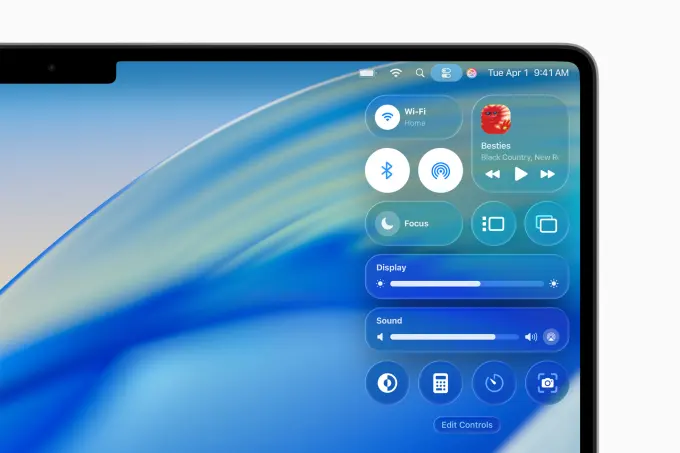
Apple has unveiled macOS Tahoe 26, the latest version of its desktop operating system, bringing a host of major changes and innovations. Announced at WWDC 2025, the update introduces a redesigned “Liquid Glass” interface, revolutionary Continuity tools like integration with the Phone app and Live Activities, as well as significant upgrades to Spotlight and system‑wide Apple Intelligence tools. The public beta of macOS Tahoe 26 is expected to launch in July, with general availability planned for later this year.
Why did Apple choose to give the new version the number 26? For a deeper look at Apple’s latest software updates and how iOS 26 and iPadOS 26 fit into its ecosystem, check out our coverage of WWDC 2025: Apple unveils iOS 26 and iPadOS 26, new look, true multitasking, and a surprising name change.
Redesigned Interface and Personalization
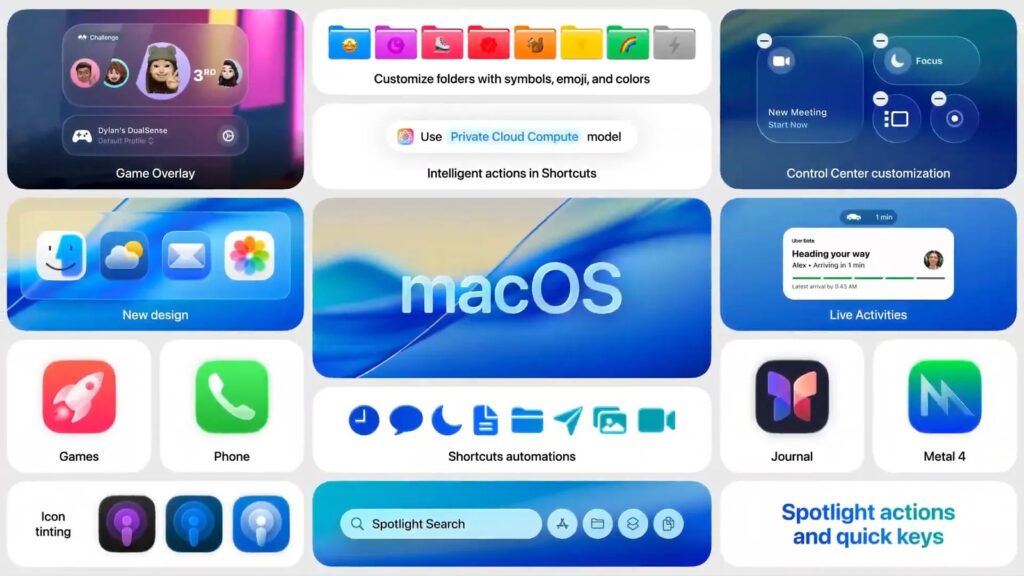
macOS Tahoe 26 refreshes the system’s appearance with a semi-transparent Dock, sidebars, and menu bar, giving it a modern and elegant look. Users gain much greater personalization options, including the ability to customize folder colors, modify Control Center layout, and switch between different icon styles. New settings also allow users to add emojis and symbols to folders, along with additional theme and appearance options, enabling a more personalized work environment.
iPhone Integration and Extended Continuity
One of the most anticipated features is the introduction of the Phone app on macOS for the first time. It allows users to make and receive cellular calls from a nearby iPhone directly on their Mac. The Mac version of the app supports familiar features such as Recents, Voicemail, and Favorites, along with new innovative tools including Call Screening and Hold Assist. Call Screening automatically prompts unknown callers to identify themselves before the call connects, while Hold Assist keeps your place in a queue when waiting for a live agent, letting you continue working without interruption.
Live Activities from iPhone are also coming to macOS. These real-time updates—such as upcoming flights, Uber rides, or sports scores—will appear in the Mac’s menu bar. Clicking on them will launch a mirrored version of the corresponding app on your iPhone, offering quick access to important information.
FaceTime has also received a redesigned layout, with contact posters for recent callers, a new control layout, and a “More” button to access options like SharePlay and Live Translation. These interface changes are also coming to iPhone and iPad, ensuring a consistent user experience.
Spotlight Enhancements and the Power of Apple Intelligence
Spotlight sees major improvements in macOS Tahoe 26. Users will now be able to initiate actions directly from the search bar, such as sending emails, starting timers, or creating notes. Additionally, Spotlight will feature filtering tools and “quick keys” – short input strings that trigger predefined actions. Search results will be grouped and prioritized based on system-detected relevance and reflect the user’s recent activity. Similar enhancements will also appear in iOS and iPadOS.
Apple Intelligence is also expanding in this version. Live Translation now works in Messages, FaceTime, and Phone, offering real-time transcription and language conversion. Shortcuts can now access both on-device and cloud-based AI models to trigger complex workflows—like comparing transcriptions with notes or generating images using tools such as Genmoji and Image Playground. Users can also connect with ChatGPT to enhance text or image generation tasks. These features are also part of the Apple Intelligence rollout on iPhones and iPads.
New Games App, Redesigned Safari, and App Improvements
macOS Tahoe also introduces a new Apple Games app, which consolidates all installed titles and adds a Game Overlay. This floating panel allows gamers to adjust settings, chat with friends, or invite others to join without leaving the game. Titles like Crimson Desert, Cyberpunk 2077, and Lies of P: Overture are optimized for Apple’s latest M-series chips, with support for ray tracing and MetalFX.
Safari will feature a redesigned interface and, according to Apple’s internal testing, will load frequently visited websites up to 50% faster than Chrome. The Messages app adds polling tools and customizable backgrounds. A journaling app is also planned for macOS. Accessibility updates include Continuity Camera support for magnification and a new Braille Access interface. Most of these features are also coming to iOS, iPadOS, and visionOS.
The Photos app has also been updated with a refreshed interface and new features like pinned collections, quick filtering and sorting tools, and adjustable tile sizes. These updates match the redesigned Photos app experience on iPadOS.
The Notes app will support importing and exporting markdown files, along with saving and transcribing recorded phone calls. These capabilities will also be available on iPhone and iPad.
The Passwords app will now include version tracking, allowing users to review changes to stored credentials with timestamps. This feature will be consistent across all Apple devices.
Availability
macOS Tahoe 26 is already available to developers, with the public beta expected in July. The update will roll out as a free software upgrade later this year.


0 Comments