

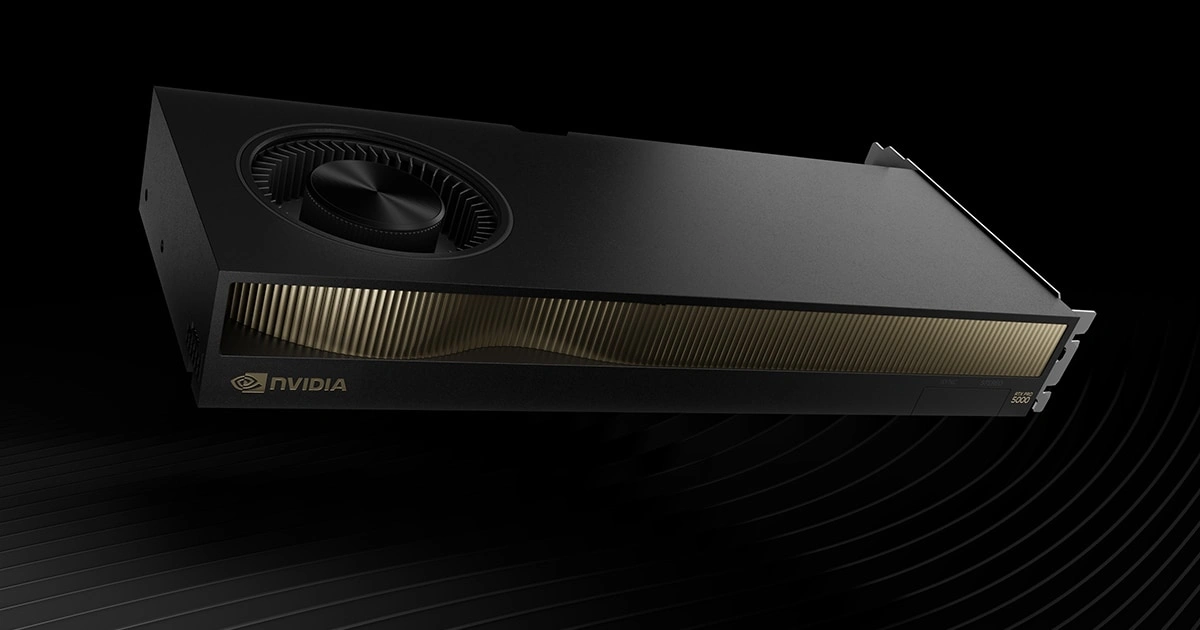
Choosing between a professional graphics card and a gaming GPU can be confusing in 2026. Professional GPUs (like NVIDIA’s RTX PRO series or AMD’s Radeon PRO) are built for reliability and specialized workflows, while gaming GPUs (such as NVIDIA’s GeForce RTX 5090 or AMD’s Radeon RX 9000 series) focus on raw speed and gaming features
. We’ll break down the differences – performance, memory, drivers, and price – and recommend the best GPU for different users.
Professional Graphics Cards: Design and Features
Professional graphics cards (also called workstation GPUs) are engineered for tasks like CAD, 3D design, animation, and scientific computing. These cards (e.g., NVIDIA RTX PRO 6000 Blackwell, RTX A6000/A5000, AMD Radeon PRO W7900/W7800) have certified drivers and hardware tested for stability in professional applications. They often include ECC (error-correcting) memory and support double-precision math for higher accuracy. As Puget Systems notes, pro GPUs typically have more VRAM and lower boost clocks to improve reliability. For example, the AMD Radeon PRO W7900 comes with 48 GB of VRAM and is built on RDNA 3 architecture with driver certification for 24/7 environments.
.
- Drivers & Certification: Workstation GPUs use validated drivers optimized for software like AutoCAD, SolidWorks, and video-editing suites
. This ensures stability and fewer crashes in mission-critical work.
Reliability & Support: These cards often carry professional warranties and support. For instance, AMD states its Radeon PRO cards are “built for demanding 24/7 environments”
.
Memory & Precision: Pro GPUs usually pack more memory (e.g. 32–48 GB or more) and sometimes ECC. They also offer stronger FP64 (double-precision) performance
- , important in scientific or engineering tasks.
Because of these extras, professional GPUs command a higher price than a similarly-specced gaming card. Puget Systems observes that “professional GPUs typically feature a higher price tag… due to additional features and certifications”. However, this premium buys stability and optimized performance. For example, although NVIDIA’s RTX 6000 Ada flagship is about $6,800
, its reliability and long-term support are crucial for studios and enterprises.
Gaming Graphics Cards: Speed and Features
Gaming GPUs (consumer cards) like NVIDIA’s GeForce series and AMD’s Radeon RX series are tuned for frame rates and visual effects. The 2025–2026 generation includes NVIDIA’s RTX 50 Series (e.g., the RTX 5060 Ti 16 GB MSI Ventus 2X OC Plus and RTX 5080 16 GB GDDR7 Gigabyte Gaming OC) and AMD’s RDNA 4-based Radeon RX 9070 XT 16 GB Asus TUF Gaming OC. These cards drive 4K or even 8K gaming and deliver incredible performance for enthusiasts.
They run at higher clock speeds and include features like HDMI 2.1 outputs and cutting-edge ray tracing cores.
Raw Performance: Gaming GPUs emphasize high frame rates. They are often built on the latest architectures with powerful raster and ray-tracing cores. For example, AMD’s RX 9900 XTX flagship offers “strong 4K gaming performance at a lower cost” than NVIDIA’s top cards, while the cards linked above show what the latest consumer GPUs can achieve in real-world benchmarks.
.
Gaming Tech: These cards support features like DLSS 4 or FSR 3.1 upscaling, high refresh-rate sync, and VR-ready capabilities
. Their drivers are updated frequently to support new games.
Value and Versatility: Consumer cards generally offer more performance per dollar for gaming and general use. Velocity Micro notes NVIDIA has a “premium pricing” on flagship cards, while AMD often provides better mid-range value
- .
However, gaming GPUs may lack some pro features. They typically do not support ECC, and their drivers aren’t certified for CAD applications. They may have less VRAM than a pro card (e.g. 32 GB top vs 48 GB on pro). In compute tasks like rendering or AI training, gaming GPUs perform well, but lack some specialized support. For instance, AMD has improved its compute stack (OpenCL/HIP), yet NVIDIA still dominates AI/compute thanks to CUDA and software support
.
Key Differences: Performance, Memory, and Drivers
Whether you need a pro GPU or a gaming GPU boils down to differences in design priorities. In short:
- Certified Drivers: Professional cards have drivers validated by ISVs for software stability
. Gaming cards focus on driver updates for the latest games.
Memory: Pro GPUs often double or triple the VRAM of gaming GPUs to handle large models (e.g. 48 GB vs ~32 GB)
. They may also use ECC memory for data integrity.
Boost and Power: To increase longevity, workstation cards typically run at slightly lower boost clocks and optimize for sustained loads
. Gaming cards may spike to higher clocks but aren’t built for 24/7 maximum load.
Precision: Some professional cards expose full FP64 performance for scientific tasks
. Gaming GPUs often limit double-precision to save die space, since gaming rarely needs it.
Price: A gaming GPU usually offers more teraflops per dollar, whereas a pro GPU costs significantly more due to validation and support
- .
- Intended Use: Gaming GPUs aim at smooth, high-fidelity graphics in games and real-time simulations. Professional GPUs aim at correctness and stability in CAD, DCC (digital content creation), and compute.
These distinctions mean it’s hard to directly compare specs. As Puget Systems explains, the tradeoff is “greater VRAM but lower boost, alongside certified drivers” for pro cards. In benchmarks, this shows up as different strengths. For example, in engineering tests, AMD’s professional GPUs (W7900/W7800) often outperformed NVIDIA’s counterparts in CAD and AEC workflows. NVIDIA’s new Blackwell workstation cards were “solid, but struggled to differentiate” from the prior generation in some cases. In contrast, gaming GPUs excel in raw rasterization and ray tracing: NVIDIA’s RTX 5090 leads in ray-traced gaming, while AMD’s RX 9000 cards deliver excellent raster performance and more VRAM per dollar
.
For a quick comparison:
- Professional GPU Strengths: High VRAM, stability, certified support, double-precision math, error correction
.
Gaming GPU Strengths: High clock speed, cutting-edge gaming features (DLSS/FSR, VR), high frame rates, and better price/perf in games
- .
- Typical Use Cases: Pro GPUs shine in CAD, 3D modeling, 3D rendering engines (once software supports them), video editing on tight deadlines, and AI/model training. Gaming GPUs shine in fast-paced games, streaming, general content creation, and VR/AR.
Performance Benchmarks and Use Cases
In real-world benchmarks, each card type leads in its domain. Gaming benchmarks (3DMark, game tests) show that flagship consumer GPUs (RTX 5090, RX 9900 XTX) achieve much higher frame rates than workstation cards at the same price point. For instance, the RTX 5090 easily hits well over 100 FPS in modern 4K titles, whereas a similarly priced pro card would run the game slower due to lower clocks.
By contrast, in professional applications, results can flip. Puget Systems found that in AEC and CAD workloads, AMD’s Radeon PRO cards often outpace NVIDIA’s offerings at each price point
. Their review noted that AMD’s pro GPUs gave the “best performance” in many design and visualization tasks, except in software that only runs on NVIDIA. Gaming GPUs can still run these apps, but without certified drivers, they may experience glitches or lack optimizations.
For GPU rendering (Blender, Redshift, etc.), NVIDIA has historically led due to CUDA support, but AMD support is growing. Puget’s content-creation tests showed AMD’s W7900/W7800 struggled behind NVIDIA’s RTX 6000 Ada in ray-traced rendering, though they excelled in rasterized or viewport tasks
.
Example scenario: An architect using BIM or CAD wants smooth interaction with models. A professional GPU like the Radeon PRO W7900 (48 GB RAM) ensures the model stays in memory and tools run without error. A gamer wants high FPS in the latest shooter; a GeForce RTX 5090 or Radeon 9900 XTX delivers that with advanced features like DLSS 4 and high refresh-rate sync
.
For content creators who do both – e.g. game developers or video producers – a gaming GPU often suffices due to its strong rendering power and lower cost. However, if their software (like certain GPU renderers or simulators) officially certifies pro cards, they may still opt for a workstation GPU to avoid compatibility issues.
For data scientists or AI developers in 2026, neither gaming nor standard pro GPUs might suffice. They often choose data-center GPUs (NVIDIA’s H100/A100 or AMD’s MI300 series) for high-performance compute and large memory, which is beyond this comparison.
For more in-depth GPU comparisons and benchmarks, see our Techbool analysis on GPU performance and selection. Techbool’s GPU guides cover the latest architectures and help you match a GPU to your specific software and tasks.
Which GPU is Right for You in 2026?
Ultimately, the best GPU depends on your needs:
- Gaming Enthusiasts & Streamers: Choose a high-end gaming GPU (NVIDIA GeForce RTX 50 series or AMD Radeon RX 9000). These offer unmatched frame rates, upscaling tech (DLSS or FSR), and moderate-to-high VRAM for gaming and content creation. They deliver the best value for pure gaming.
- Professional Creators & Engineers: Opt for a workstation GPU (NVIDIA RTX PRO/A-series or AMD Radeon PRO W-series). The extra VRAM, certified drivers, and reliability pay off in professional apps. You’ll get stable performance in CAD, 3D modeling, design, and compute tasks, even if raw frame rates in games aren’t as high.
- Hybrid Users: If you do both, consider your budget and primary workload. A top-tier gaming GPU can handle many creative apps well, but a mid-range pro GPU (like an RTX PRO 4000/5000 or Radeon PRO W7600) can be a balanced choice for content creators who use Adobe or Unreal Engine heavily. Check whether your key software is certified for any GPU line.
- Budget Constraints: Entry to mid-range gaming GPUs usually beat similarly priced workstation GPUs for general performance. Only pay the pro tax if you truly need those certifications and extra VRAM.
Pros and Cons at a Glance:
- Professional GPU Pros: Certified stability, large VRAM, ECC memory, double-precision support
. Ideal for critical workloads.
Professional GPU Cons: High cost, lower raw clock performance in games, generally not optimized for gaming.
Gaming GPU Pros: Highest framerates and gaming features per dollar
- . Good for games, general graphics work, and streaming.
- Gaming GPU Cons: Less VRAM/memory bandwidth, no ECC, and potential driver issues in some pro applications.
Summary and Next Steps
In 2026’s GPU landscape, there’s no one-size-fits-all answer. Professional graphics cards shine in work environments that demand stability, huge memory buffers, and certified software support. Gaming GPUs deliver maximum rendering speed and features for entertainment and general creativity
.
Before deciding, list your main applications and check their GPU recommendations. For in-depth guidance, Techbool offers GPU benchmark articles and guides. Ultimately, choose the GPU that aligns with your primary tasks. Upgrade today and get the performance and reliability your workflows or games deserve!
Meta Title: Professional vs Gaming GPUs: Choosing the Right Graphics Card in 2026
Meta Description: Professional vs gaming graphics cards: which suits your needs in 2026? Compare performance, memory, and features to pick the right GPU for gaming or work.
0 Comments