

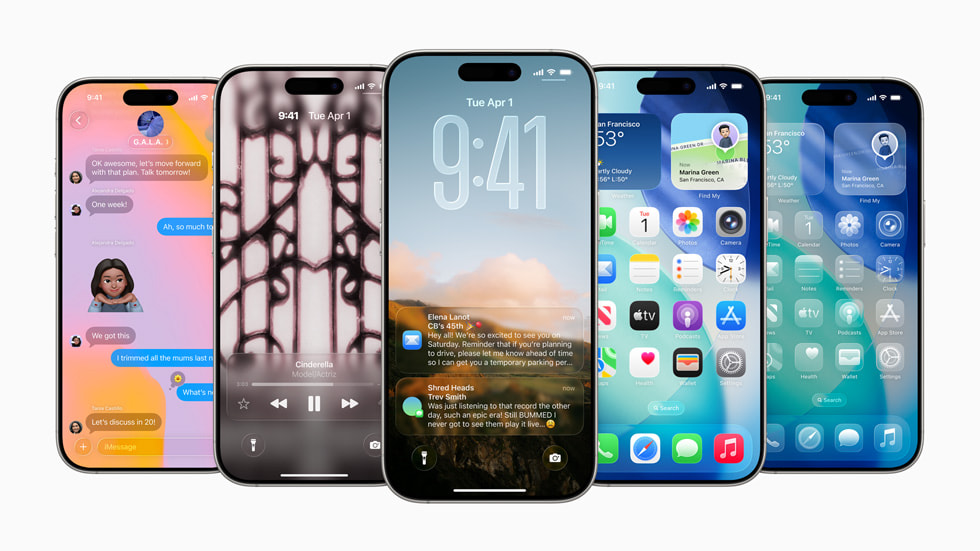
This year’s WWDC 2025 conference brought one of the biggest revolutions in the Apple ecosystem in years. The Cupertino-based company presented new versions of its operating systems, led by iOS 26 and iPadOS 26. The surprise is not only the vast functional changes but also a new naming strategy aimed at unifying the entire platform.
A Leap into the Future: Why iOS 26 and Not iOS 19?
As expected, Apple broke away from the tradition of increasing the version number by one each year. Instead of iOS 19, the world saw iOS 26. Although this decision seems unusual at first glance, it has a deep strategic rationale. Apple is aiming for full unification of its ecosystem. Adopting a naming scheme based on the year (implying the year the system will dominate, i.e., 2026) is meant to organize and unify the portfolio.
From now on, all key operating systems will share the same numbering:
- iOS 26
- iPadOS 26
- macOS 26
- watchOS 26
- tvOS 26
- visionOS 26
This symbolic step highlights that regardless of the device, the user moves within a single, coherent, and integrated environment.
iOS 26: The Biggest Visual Change in a Decade
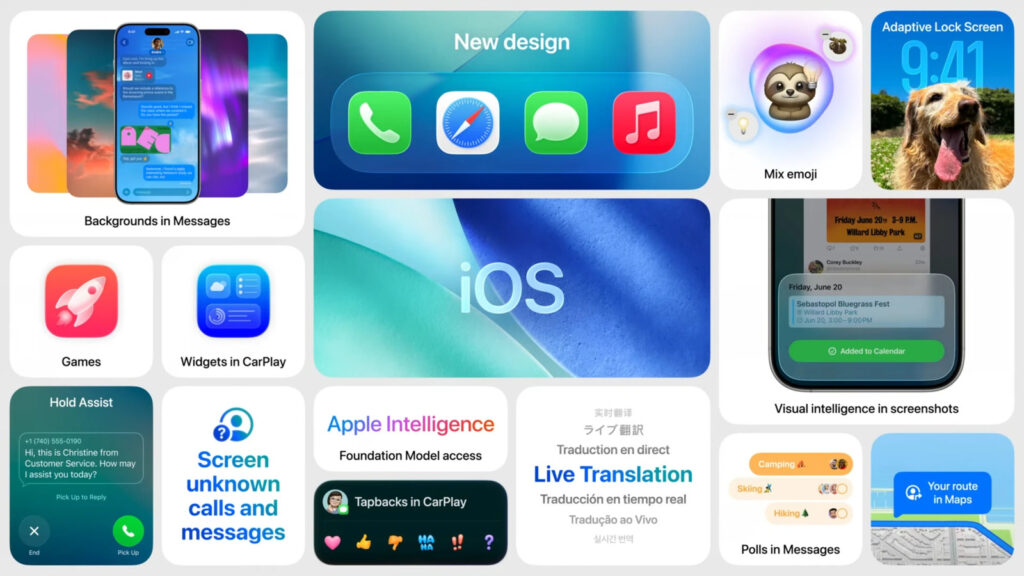
iOS 26 is primarily a visual revolution. Apple has taken its boldest step since the launch of iOS 7 in 2013, breaking away from the previous flat design in favor of a style inspired by visionOS.
Key new features in iOS 26:
- New Design Language “Liquid Glass”: The interface draws heavily from Vision Pro goggles. Dominated by transparencies, blurred backgrounds resembling frosted glass, and subtle shading that gives elements depth and a 3D effect.
- Refreshed Icons: Although rumors about circular icons were not confirmed, their appearance has changed significantly. Users can now choose among three themes: light, dark, and a completely new “glass” theme that perfectly matches the system’s new style.
- New “Games” App: The Game Center service is replaced by a full-fledged Games app. It acts as a central hub for gamers:
- Aggregates all games installed on the iPhone.
- Helps discover new titles in the App Store.
- Manages achievements and progress.
- Integrates a chat for communicating with friends and social features.
iPadOS 26: iPad Finally Without Compromises
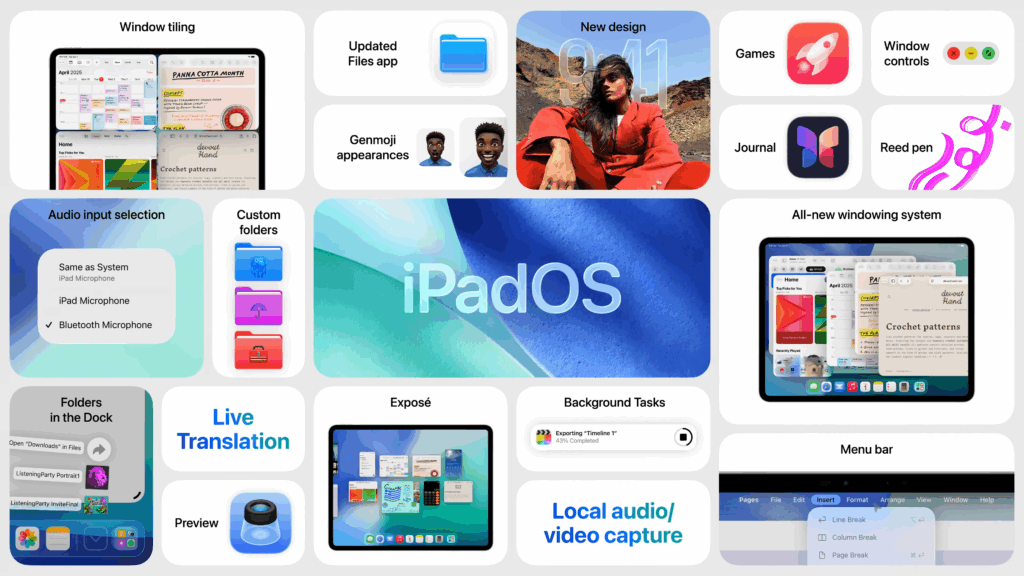
While changes in iOS are mainly visual, iPadOS 26 is a real breakthrough in functionality, blurring the line between tablet and computer. Apple has finally listened to the most demanding users.
The most important features in iPadOS 26:
- True Multitasking and Windows: This is the absolute hit of the new version. Users can finally:
- Open multiple app windows simultaneously.
- Resize and move windows freely across the entire screen, similar to macOS or Windows.
- Use a “snap” feature to dock windows to the edges so they occupy half or a quarter of the screen.
- Use a swipe gesture to display all open windows side by side.
- Menu Bar and Preview App: A contextual menu bar, known from Mac, appears at the top of the screen, facilitating access to key app functions. The Preview app also arrives on iPad, allowing quick editing of documents, PDFs, and images without opening dedicated programs.
- Background Processes: iPadOS 26 allows demanding background tasks to run for the first time. This means you can start exporting a long video and freely use other apps simultaneously.
- Improved Files App: File management becomes much more intuitive and closer to the macOS Finder. Sorting and searching are simplified, and downloaded files go to a dedicated folder in the Dock. Files and folders can now be dragged directly to the Dock for quick access.
- New Apps: Like on the iPhone, the Games app debuts on iPad. Additionally, the Journal app known from iOS comes to tablets, allowing synchronization of entries across devices.
Availability
As usual, the public release of iOS 26 and iPadOS 26 is scheduled for September. However, developers and interested users can test beta versions starting June 9. The official list of compatible devices will be published on Apple’s website, but support for the oldest iPhones and iPads is expected to end.
iiOS 26 — List of Supported Smartphones
Apple announced that iOS 26 will be available on:
- iPhone SE (2nd and 3rd gen)
- iPhone 11
- iPhone 11 Pro
- iPhone 11 Pro Max
- iPhone 12
- iPhone 12 mini
- iPhone 12 Pro
- iPhone 12 Pro Max
- iPhone 13
- iPhone 13 mini
- iPhone 13 Pro
- iPhone 13 Pro Max
- iPhone 14
- iPhone 14 Plus
- iPhone 14 Pro
- iPhone 14 Pro Max
- iPhone 15
- iPhone 15 Plus
- iPhone 15 Pro
- iPhone 15 Pro Max
- iPhone 16
- iPhone 16 Plus
- iPhone 16 Pro
- iPhone 16 Pro Max
- iPhone 16e
Support has been dropped for all smartphones from 2018, including the iPhone XS, XS Max, and XR.
Source: Apple

0 Comments