What you will understand
- Every cell is a recalculated scenario, not a probability.
- A reserve breach can precede a negative balance.
- One-time shocks and monthly compounding answer different questions.
Why one downside is often not enough
A base case and one downside are useful until someone asks a nearby question: what if revenue misses by only 10%, but costs rise by 20%? A sensitivity matrix makes those combinations explicit. It shows which assumptions have the greatest effect on the result and where a chosen reserve is crossed.
The matrix is a decision aid rather than a prediction. It cannot tell you how likely each combination is. That requires separate evidence about the business, its customers, commitments and market. Giving a red cell a precise probability just because it appears on a grid would overstate what was calculated.
Fix the baseline and the question before building the grid
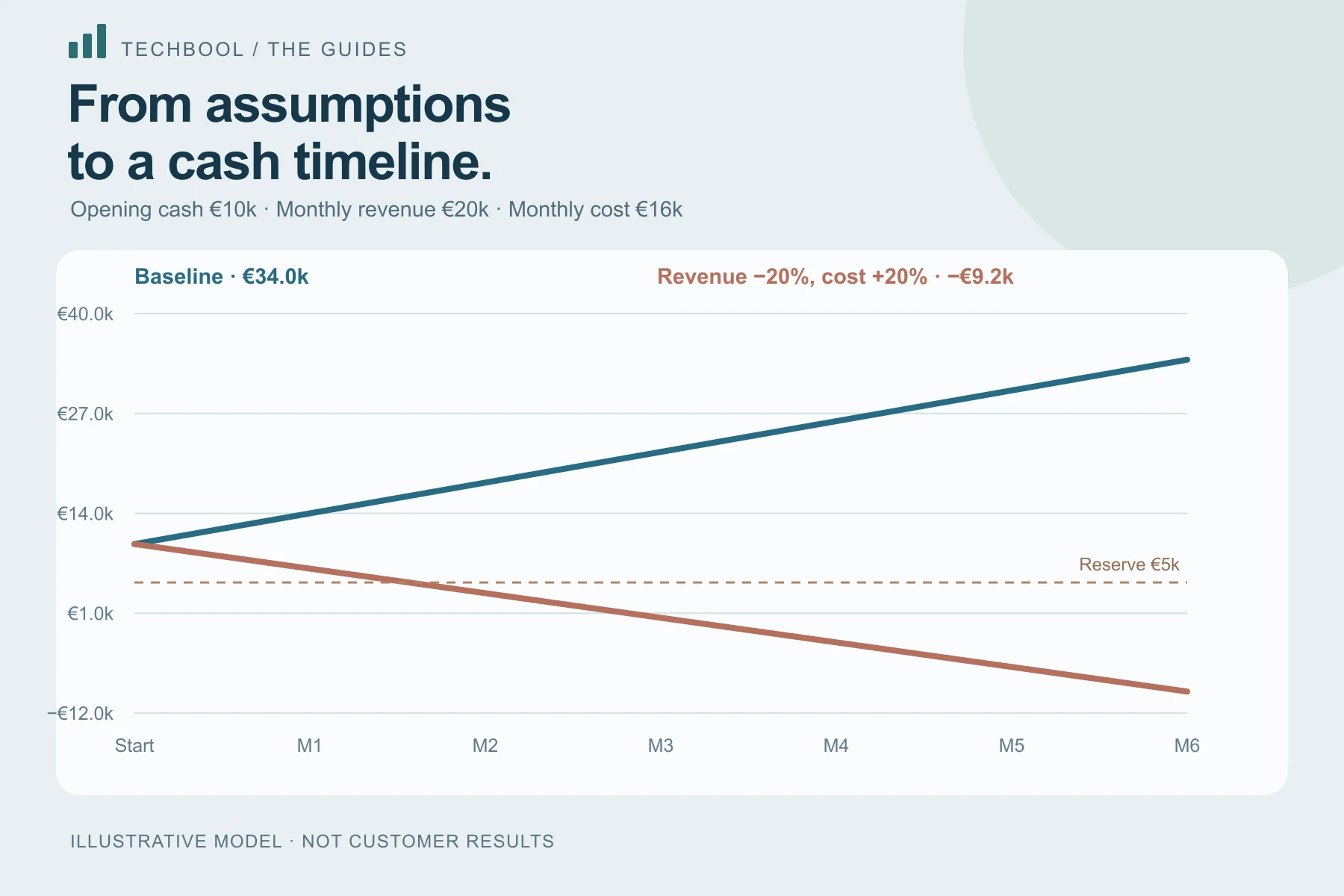
This example starts with EUR 10,000 cash, monthly revenue of EUR 20,000 and monthly costs of EUR 16,000. There are six projection months, same-month collections and no growth. The reserve floor is EUR 5,000. The unchanged case ends at EUR 34,000.
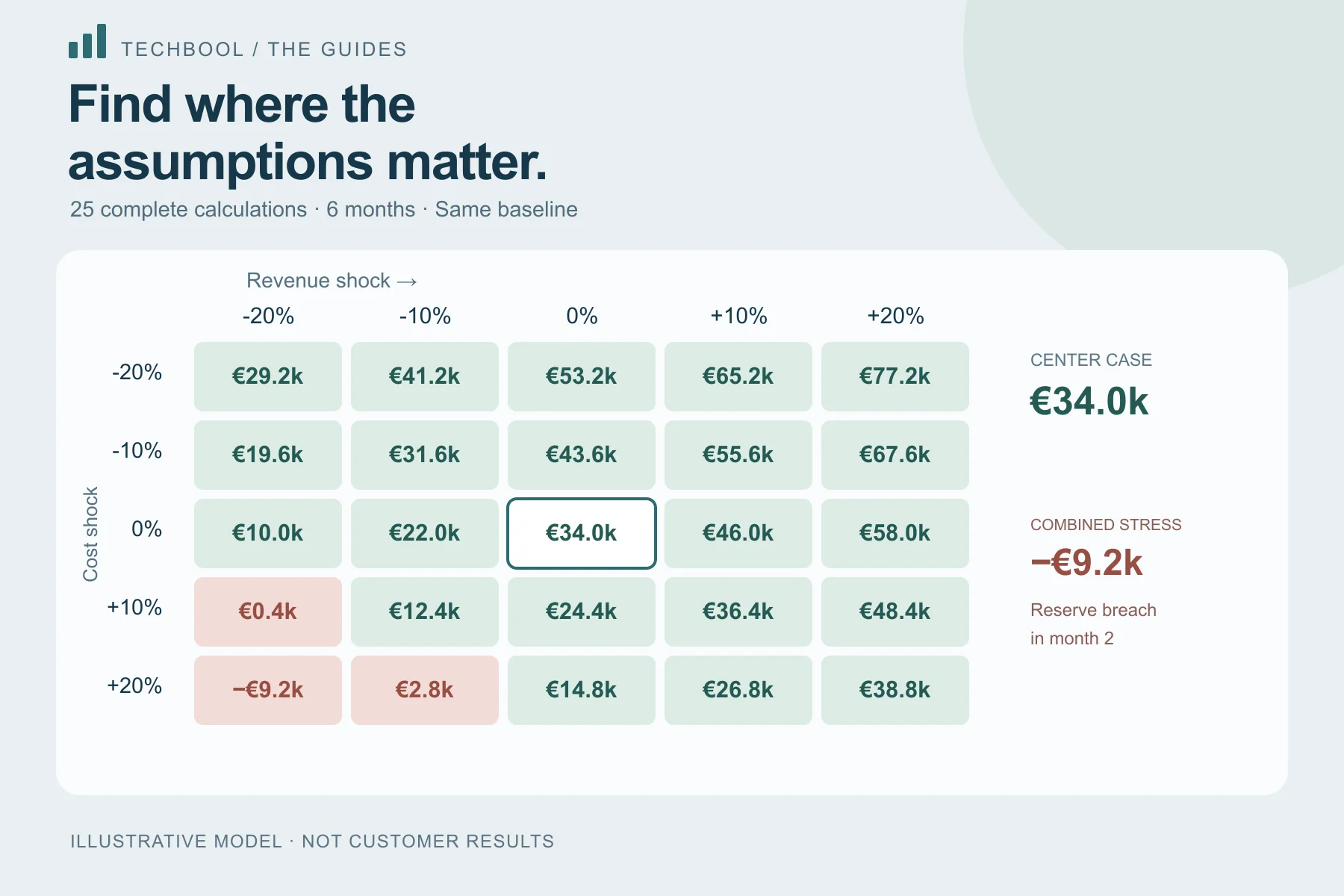
Vary revenue and cost shocks around that baseline. With a ten-percentage-point step, the five tested changes are minus 20%, minus 10%, 0%, plus 10% and plus 20%. Crossing five revenue changes with five cost changes produces 25 complete calculations.
Keep opening cash, collection delay, growth and the horizon fixed across the grid. Otherwise the cells do not isolate the same two assumptions. A saved matrix should retain the scenario it was based on so another reader can understand its starting point without guessing.
Read a cell by translating it back into money
The cell with revenue down 20% and costs up 20% has monthly revenue of EUR 16,000 and cost of EUR 19,200. Starting with EUR 10,000 and losing EUR 3,200 per month produces ending cash of minus EUR 9,200. Its first monthly reserve breach occurs in month two, at EUR 3,600.
At revenue down 20% with unchanged costs, both monthly figures are EUR 16,000. Cash stays at EUR 10,000. At unchanged revenue with costs up 20%, the business adds only EUR 800 each month and ends at EUR 14,800. These neighboring cells tell a more useful story than generic best-case and worst-case labels.
| Revenue shock | Cost shock | Ending cash | First reserve breach |
|---|---|---|---|
| 0% | 0% | EUR 34,000 | None |
| -20% | 0% | EUR 10,000 | None |
| 0% | +20% | EUR 14,800 | None |
| -20% | +20% | -EUR 9,200 | Month 2 |
| +20% | -20% | EUR 77,200 | None |
Inspect the monthly path as well as the final value
Ending cash compresses six months into one figure. A longer scenario with growth or delayed receipts can fall below reserve early and recover later. An ending balance above the floor does not prove that every preceding month stayed above it.
Techbool records ending cash, the lowest cash balance and the first monthly reserve breach for each valid cell. The color indicates a reserve breach during the tested path, not merely whether the final value is negative. Its lowest-balance calculation includes opening cash; the first-breach label refers to a projected month-end.
This distinction matters if opening cash is already below the floor. That is a known starting condition, not a newly discovered forecast event. State it separately so the chart does not imply the business began with an adequate reserve.
A one-time shock is not a monthly growth rate
A one-time 10% revenue shock changes starting revenue from EUR 20,000 to EUR 22,000. With zero monthly growth, it stays there. Monthly growth of 10% is different: it compounds from one month to the next. The same percentage label can therefore lead to very different trajectories.
The Techbool matrix adds its tested percentage points to the saved immediate shocks and recalculates the complete scenario. It preserves saved growth and collection timing. If the original scenario already has a minus 10% revenue shock, a matrix column testing minus 20 additional percentage points produces a total shock of minus 30%.
Use the headings and exported assumptions together. Comparing a grid built from an already stressed baseline with one built from an unstressed baseline without noticing the difference is an easy source of misleading conclusions.
Choose ranges for a business reason
A symmetric grid is convenient, but the plausible operating range may not be symmetric. A signed annual lease might be relatively stable while revenue is exposed to one contract. Use the range to investigate a defensible question rather than manufacture an impressive red corner.
Techbool supports sensitivity steps from one to twenty percentage points and marks unsupported combinations unavailable. An unavailable cell is not zero cash, a safe outcome or a failed business. It means that combination is outside the supported input or amount bounds. Preserve that distinction in exported reports.
If your uncertainty is about invoice dates, use a timing scenario instead of pretending a revenue percentage represents collections. A row or column cannot capture a mechanism the model does not contain.
Turn the matrix into a concrete follow-up
After locating a sensitive area, identify which assumption can be investigated or changed. Can the cost commitment be staged? Is the revenue change concentrated in one contract? Would payment terms move the first reserve breach? These are questions for the business, not automatic recommendations made by a grid.
Choose two or three cells that matter and preserve the evidence: starting inputs, horizon, tested shocks, reserve and monthly path. A smaller set of clearly justified comparisons is easier to discuss than a large chart with invisible assumptions.
- Check the center cell against the saved baseline.
- Read the first reserve breach and lowest balance.
- Explain why the tested ranges matter.
- Distinguish an unavailable cell from a calculated loss.
- Do not interpret grid cells as probability estimates.
Build a saved sensitivity analysis in Techbool
Sensitivity analysis is included in Plus and Pro. Start from a saved scenario, open Decision lab, select the sensitivity step and calculate. The saved analysis retains its inputs and calculation version. You can export the matrix as CSV or its full record as JSON, or print a report.
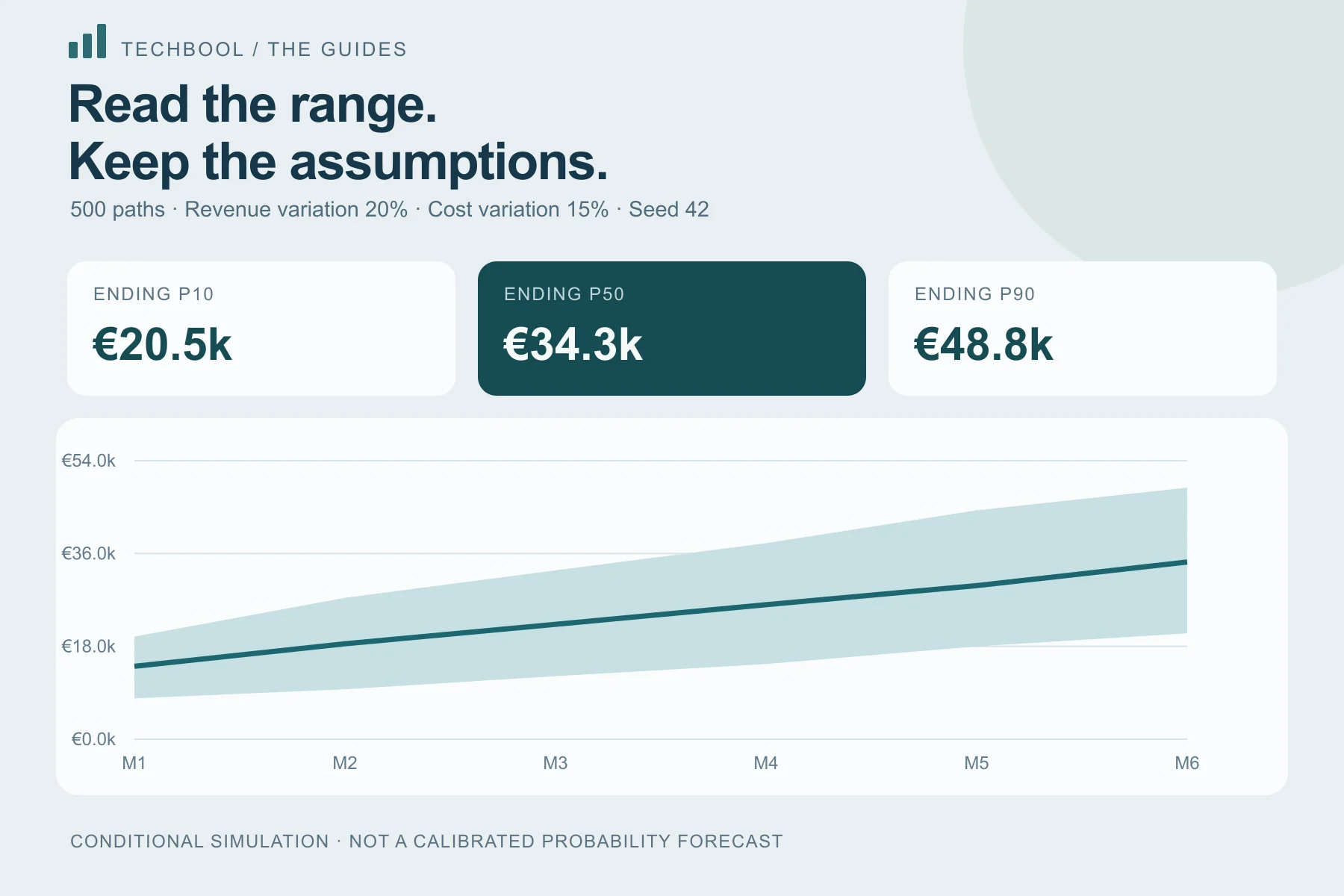
Free can still be used to build and compare individual six-month cases before choosing a paid analysis tool. If the question is about a conditional range rather than a fixed grid, the Monte Carlo guide explains how that different model should be read.
Keep the inputs.
Understand the outcome.
Start with a Free workspace. Inspect the calculation and compare a second scenario before choosing a paid analysis tool.