What you will understand
- Start with your data source and decision, not a feature-count contest.
- Techbool currently uses manual inputs or CSV for individual monthly EUR scenarios.
- Switching to a simpler model can remove information you still need.
There is no useful universal winner without a job to do
A founder comparing a cost increase, a finance team managing next week's payments and an adviser preparing a complete financial forecast do not necessarily need the same workflow. A product can fit one of those jobs and be incomplete for another.
This comparison uses the providers' public documentation, reviewed on 28 October 2026, and Techbool's implemented scope. We have not benchmarked competitor accounts or measured customer savings. The purpose is to identify what to evaluate, not claim that every customer should switch.
When the job is operational cash visibility
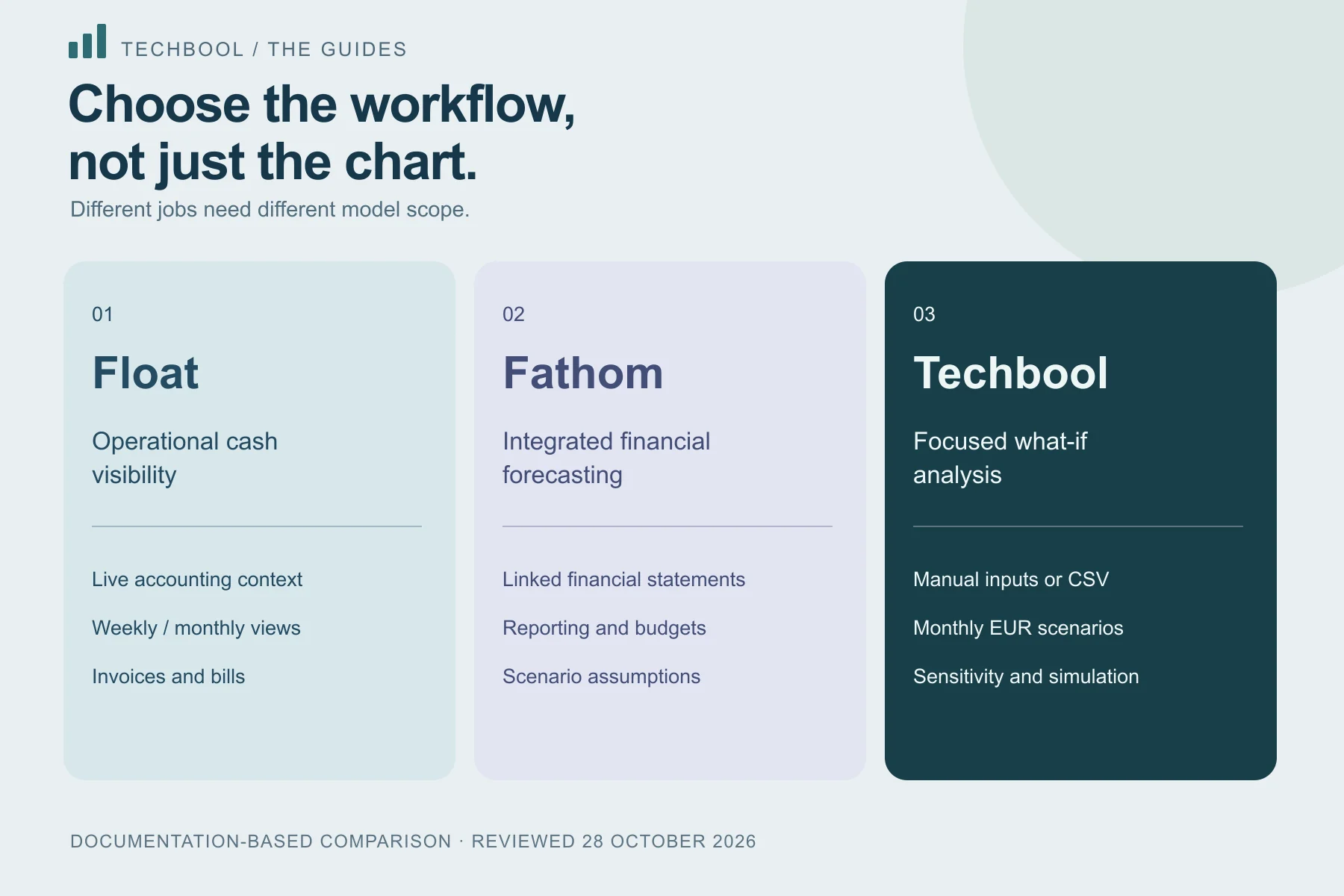
Float describes accounting-software connections, automatically updated cash positions, weekly and monthly views, invoices and bills, scenario layers and team permissions. Its scenario documentation explains budget changes layered over a base forecast. The live accounting context is important to evaluating that workflow.
If that is the job you need, replacing it with a manually entered monthly average removes information. Evaluate the connection, reconciliation process and planning granularity rather than assuming that two products displaying a cash chart are interchangeable.
When the job is an integrated financial forecast
Fathom describes forecasting linked to reporting, including profit-and-loss, balance-sheet and cash-flow projections. Its documentation also describes scenario assumptions, budget linking and reporting against actuals. That is a different scope from a model containing only operating revenue, costs and collection delay.
If your decision depends on how operating assumptions flow into complete financial statements, evaluate those connections explicitly. A tool omitting taxes, financing or balance-sheet schedules should not be presented as equivalent just because it exports a report.
When a focused scenario workspace is the job
Techbool starts from manual inputs or aggregate monthly CSV history. You supply opening cash, a reserve, revenue and cost assumptions, immediate shocks, growth and collection delay. Saved results can be compared for matching months and exported with their assumptions.
Plus adds a 25-cell revenue/cost sensitivity matrix. Pro adds a reproducible 500-path conditional simulation and percentile summaries. These tools explore assumptions. They do not automatically connect to accounting software or replace omitted financial schedules.
Accounts are individual, projections are monthly and amounts are EUR. There are no shared team roles or multi-company consolidation. Someone with a suitable aggregate dataset and a bounded what-if question can evaluate this workflow without adopting a broader reporting system.
Use a checklist you can verify
Before comparing subscriptions, list the information that must survive the process. Does the result need individual invoices, a daily payment schedule, an integrated balance sheet or only a consistent monthly operating baseline? The answer changes both the shortlist and the work needed to maintain it.
Techbool's limits are explicit below. For alternatives, verify features and their availability in the plan and region you are evaluating. A platform page does not necessarily promise every capability in every subscription.
| Question | Techbool today | What to verify elsewhere |
|---|---|---|
| Where do inputs come from? | Manual baseline or CSV | Supported connections and reconciliation |
| What time detail is modelled? | Monthly | Whether exact dates or weekly cash are supported |
| Are financial statements linked? | No | P&L, balance-sheet and cash-flow relationships |
| Can a team collaborate? | Individual account | Roles, permissions and client/company separation |
| Can I trace assumptions? | Saved inputs and CSV/JSON outputs | Original inputs and change history |
| Which currencies work? | EUR | Currency and consolidation needs |
What a switch would actually involve
To evaluate Techbool alongside an existing tool, export aggregate monthly figures you are entitled to use. Check definitions of revenue and operating cost, choose an appropriate opening cash balance and identify excluded cash movements before running a scenario.
Do not expect a CSV import to recreate invoice timing, account mappings, permissions, notes or a complete forecast built elsewhere. Techbool does not currently offer a one-click migration from Float or Fathom. Keeping those expectations clear is more useful than calling a file upload an integration.
Use one well-understood decision as the evaluation case. Reproduce its assumptions, compare matching monthly outputs and investigate differences. A discrepancy caused by missing receivables or financing is a difference in model scope, not evidence that one calculation is more accurate.
Try a representative task before buying
The monthly forecast guide provides a six-month example and inspectable CSV that fit Free. Reproduce it, then replace the inputs with figures appropriate to your business. Check whether you can explain the cash path, save a second scenario and export the assumptions clearly.
If your actual task needs a matrix or conditional simulation, evaluate the Plus or Pro workflow. If it needs automatic accounting data, an exact payment schedule, team roles or a complete financial forecast, recognize that those are outside Techbool's current scope. A clear mismatch is a useful evaluation result.
Consider the work needed after the first successful calculation. Who updates the inputs? How will reviewers know which assumptions changed? Can the result be reproduced? An easy initial chart can become expensive to maintain when its data provenance is unclear. Compare the ongoing workflow as well as the first screen.
Compare the commitment as well as the feature list
Techbool offers Free, Plus at EUR 29 per month and Pro at EUR 99 per month. Its paid plans renew monthly until cancelled. Plan limits and billing terms are shown on the pricing page and before checkout. These prices alone do not establish value: the relevant question is whether the paid feature improves a recurring task you actually perform.
For any alternative, inspect current pricing, cancellation, data export and what happens to saved work after changing a plan. Do not infer those terms from an old review or this feature comparison. Before switching, preserve exports and check that the destination can represent the assumptions you need.
Float and Fathom are independent products, identified here for comparison. Techbool is not affiliated with or endorsed by either provider. Their features can change; follow the documentation links before committing to a workflow.
Keep the inputs.
Understand the outcome.
Start with a Free workspace. Inspect the calculation and compare a second scenario before choosing a paid analysis tool.